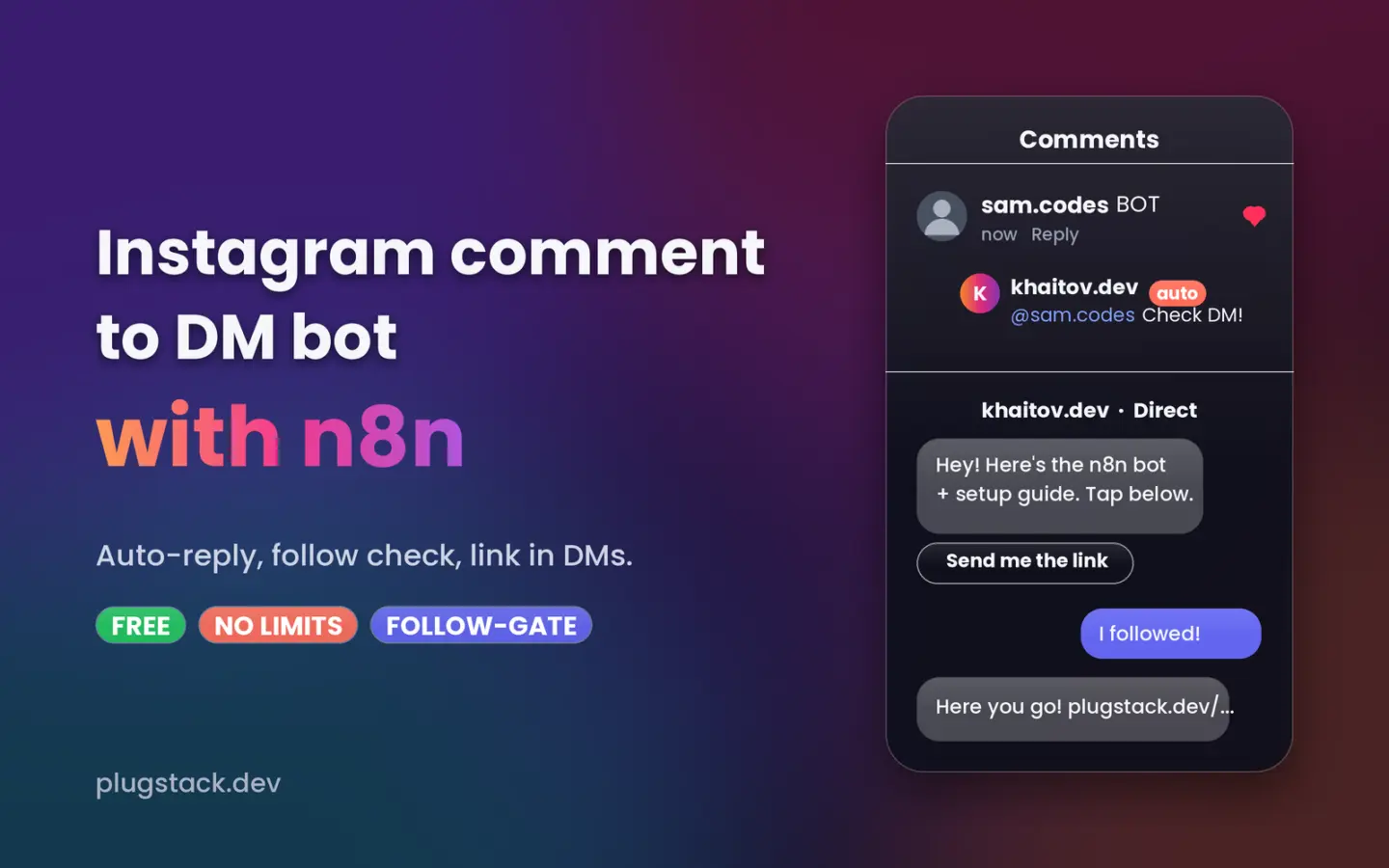
ManyChat charges $29/month for this. You can run it yourself for $0 in software. In this guide you’ll set up an n8n workflow that watches your Instagram comments, sends an automatic DM to anyone who comments a keyword, checks whether they follow you, and only then sends the link. It’s the same “comment GUIDE and I’ll DM it to you” flow big creators use – self-hosted, with no contact limits.
I built this for my own account (@khaitov.dev) and it runs in production. Everything below is what actually worked, including the problems I hit and how to fix them.
What the workflow does
- Someone comments a keyword (for example
GUIDE) on any of your posts or Reels. - n8n receives the comment through Meta’s official webhook within seconds.
- The bot replies publicly under the comment (“Sent! Check your DMs 📩”) and sends a private DM with a button.
- When they tap the button, the bot checks whether they follow you.
- Following → they get the link. Not following → they’re asked to follow first, then tap “I followed ✅” to get it.
- Every step is counted, so you can see how many comments, clicks, new followers and links each keyword produced.
Extras built in:
- Keywords are case-insensitive:
guide,Guide!andGUIDE 🙏all work. - Several keywords can point to one link (handy for typos like
PROMT). - The same keyword can send a different link on a specific Reel.
- No duplicate DMs, even if Meta re-sends an event.
- The access token refreshes itself every week, so you never have to rotate it by hand.
- Normal DMs are left alone — the bot only reacts to its own keywords.
Is it really free?
The software is. n8n Community Edition is free to self-host with unlimited executions, and Meta’s Instagram API costs nothing. What you need is somewhere to run n8n with a public HTTPS address:
| Option | Cost | Notes |
|---|---|---|
| A server you already have | $0 | Fastest path — skip to Step 1. |
| Oracle Cloud Always Free | $0 | Card required at sign-up; free capacity is sometimes unavailable in busy regions. |
| Small VPS (Hetzner, Contabo, etc.) | ~$4–6/month | The most reliable choice. |
| n8n Cloud | 14-day trial, then paid | No server work, but not free long-term. |
Avoid free hosts that put your app to sleep when idle. Meta’s webhooks arrive late or fail, and comments get missed.
What you’ll need
- An Instagram professional account (Creator or Business). Personal accounts can’t use the API.
- A free Meta for Developers account.
- n8n running on a public HTTPS domain (Meta rejects plain HTTP).
- A public privacy policy page on your website (needed in Step 6).
- About 45 minutes.
Step 0 — Run n8n with Docker (skip if you already have it)
On a fresh Linux server with Docker installed, point a subdomain such as n8n.yourdomain.com at the server’s IP, then create these two files in an empty folder.
docker-compose.yml
services:
  n8n:
    image: docker.n8n.io/n8nio/n8n
    restart: unless-stopped
    environment:
      - N8N_HOST=n8n.yourdomain.com
      - N8N_PROTOCOL=https
      - WEBHOOK_URL=https://n8n.yourdomain.com/
      - GENERIC_TIMEZONE=UTC
      - N8N_PROXY_HOPS=1
      - EXECUTIONS_DATA_SAVE_ON_SUCCESS=all
      - EXECUTIONS_DATA_PRUNE=true
      - EXECUTIONS_DATA_MAX_AGE=168
    volumes:
      - n8n_data:/home/node/.n8n

  caddy:
    image: caddy:2
    restart: unless-stopped
    ports:
      - "80:80"
      - "443:443"
    volumes:
      - ./Caddyfile:/etc/caddy/Caddyfile
      - caddy_data:/data

volumes:
  n8n_data:
  caddy_data:
Caddyfile

n8n.yourdomain.com {
    reverse_proxy n8n:5678
}
Start it with docker compose up -d. Caddy gets an SSL certificate automatically. Open https://n8n.yourdomain.com and create your owner account.
Why these settings matter: WEBHOOK_URL makes n8n show your real domain instead of localhost in webhook URLs. The EXECUTIONS_DATA_* lines keep a 7-day history of successful runs. Without them, only failed runs are saved, which makes testing confusing.
Step 1 — Create the Meta app
- Go to developers.facebook.com/apps → Create app.
- Choose the Instagram use case (the one for managing messages and content on Instagram). Meta renames these options from time to time; pick the one that mentions Instagram API.
- Open API setup with Instagram business login.
- In Add required messaging permissions, make sure these three are enabled:
instagram_business_basicinstagram_business_manage_commentsinstagram_business_manage_messages
- In Generate access tokens, click Add account and log in with your Instagram professional account.
- Copy two values: the account ID shown under your username (a long number starting with
1784…) and the token from Generate token.
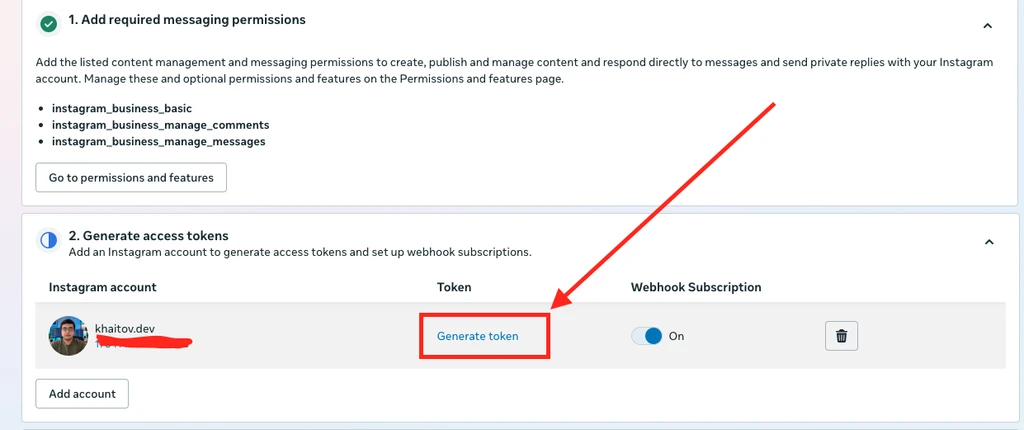
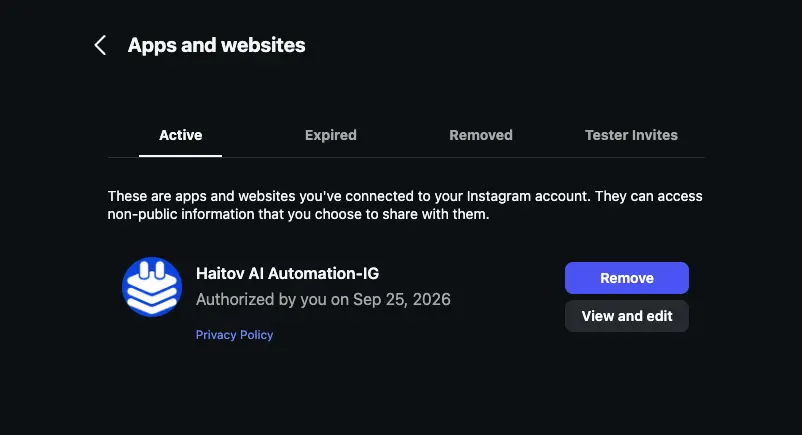
⚠️ Treat the token like a password. Anyone who has it can send DMs from your account. Don’t paste it in chats, screenshots or public repos. If it leaks, remove the app under Instagram → Settings → Apps and websites, then generate a new token.
Step 2 — Allow message access in Instagram
In the Instagram app go to Settings → Messages and story replies → Message controls → Connected tools and turn on Allow access to messages. Without this, the API can’t send DMs.
Step 3 — Import and configure the workflow
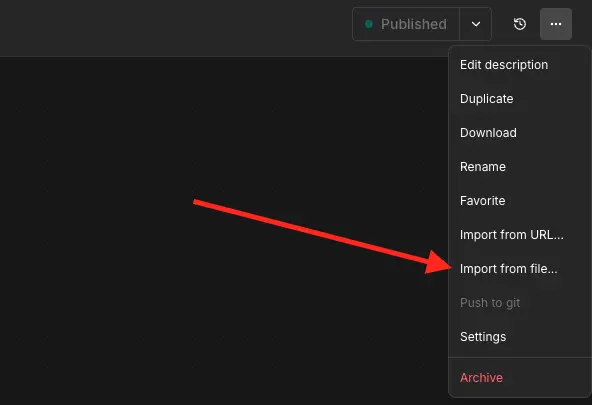
- In n8n: Create workflow → ⋯ → Import from file and pick the JSON you downloaded.
- Open the Config node. It’s the only node you need to edit.
const CONFIG = {
  IG_USER_ID: '1784xxxxxxxxxxxx',        // account ID from Step 1
  ACCESS_TOKEN: 'IGAA...',               // token from Step 1
  VERIFY_TOKEN: 'any-long-random-string',// you'll paste this into Meta in Step 5
  API_VERSION: 'v23.0',
  ACCOUNT_HANDLE: '@your_handle',
  FAIL_OPEN: true,
  PUBLIC_REPLY: true,
  KEYWORDS: {
    GUIDE:  { title: 'free guide',  link: 'https://yoursite.com/guide' },
    PROMPT: { title: 'prompt pack', link: 'https://yoursite.com/prompts' },
  },
  ...
};
For VERIFY_TOKEN use something random. On macOS or Linux, openssl rand -hex 16 generates one.
- Click Publish (older n8n versions: toggle the workflow to Active).
Check that it’s live. Open this in your browser, with your own domain and verify token:
https://n8n.yourdomain.com/webhook/ig-dm?hub.mode=subscribe&hub.verify_token=YOUR_VERIFY_TOKEN&hub.challenge=test123If the page shows test123, you’re ready for Meta.
Step 4 — Understand the button and the fallback
Instagram only lets you check whether someone follows you after they’ve interacted with your DMs — a comment alone isn’t enough. That’s why the first DM includes a “Send me the link” button: tapping it gives the bot permission to check the follow and continue.
If Instagram ever rejects the button, the workflow automatically sends a text version instead: “Reply YES and I’ll send you the link”. Replying works exactly like tapping.
Step 5 — Connect the Meta webhook
- In your Meta app, open Configure webhooks.
- Callback URL:
https://n8n.yourdomain.com/webhook/ig-dm - Verify token: the same
VERIFY_TOKENfrom the Config node. - Click Verify and save.
- Under Webhook fields, subscribe to
comments,messagesandmessaging_postbacks. - Make sure Webhook subscription is On for your account in the token section.
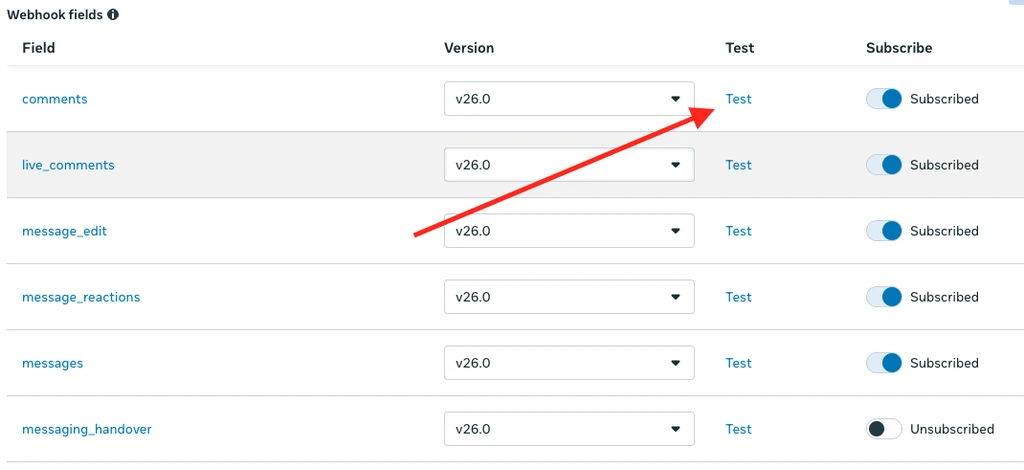
Click Test next to the comments field. A new execution should appear in n8n → Executions. Meta’s test event contains no keyword, so nothing gets sent — that’s expected.
Step 6 — Switch the app to Live (the step everyone misses)
This is where I lost the most time. While the app is in Development mode, Meta does not send you comments from other people. Meta’s Test button works, but your followers’ comments never arrive. The comments API even shows comments_count: 3 while returning an empty list.
You do not need App Review when you only use your own account. You only need to fill in the basics and switch to Live:
- App settings → Basic: add your Privacy Policy URL, a User data deletion instructions URL (a section on the same page is fine), a category, an app icon (1024×1024) and a contact email. Save.
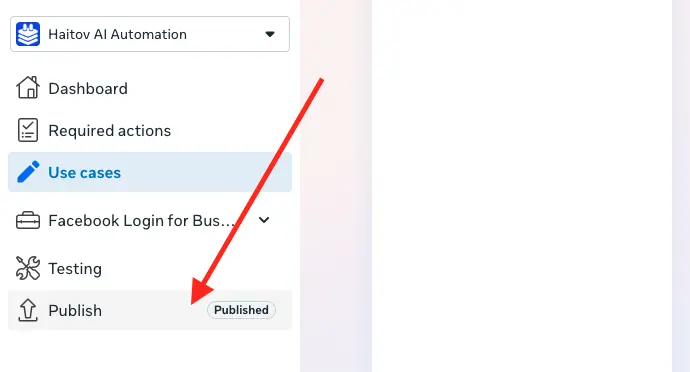
- Switch App Mode from Development to Live (in newer dashboards: Publish in the left menu).
Your privacy policy must be publicly reachable. Open it in a private window to check, and if you use Cloudflare, make sure Bot Fight Mode isn’t blocking Meta’s crawler. It should say what Instagram data you receive (user ID, username, comment/message text, follow status), why, how long you keep it, and how people can ask for deletion.
Step 7 — Test it for real
- From a different Instagram account, comment your keyword on any of your posts. Comments from your own account are ignored on purpose, so the bot never answers itself.
- Within seconds you should see the public reply and a DM on the test account.
- Tap Send me the link. If the test account doesn’t follow you, you’ll get the follow-first message. Follow, tap I followed ✅, and the link arrives.
See your stats
Open this URL (bookmark it, and don’t share it — it contains your verify token):
https://n8n.yourdomain.com/webhook/ig-dm?stats=YOUR_VERIFY_TOKEN| Field | Meaning |
|---|---|
comments | Comments that contained the keyword |
clicks | People who tapped the button or replied YES |
followGate | People asked to follow first — roughly your new followers from this keyword |
links | People who received the link |
tokenRefreshedAt | Last automatic token refresh (fills in after the first week) |
lastEvents | The 30 most recent events (times in UTC) |
Customizing
Add a keyword for a new Reel
Add one line to KEYWORDS and click Publish:
PRICING: { title: 'freelance pricing sheet', link: 'https://yoursite.com/pricing' },Tip: use a different keyword for each Reel. Your stats then show which video brought the leads.
Several keywords, one link (typos included)
Define the resource once, above const CONFIG = {, and reuse it:
const PROMPT_PACK = { title: 'prompt pack', link: 'https://yoursite.com/prompts' };

// inside KEYWORDS:
PROMPT:  PROMPT_PACK,
PROMPTS: PROMPT_PACK,
PROMT:   PROMPT_PACK,
Matching uses whole words, so add plural forms separately.
Same keyword, different link on one Reel
Use POSTS with the Reel’s media ID. Everything else falls back to KEYWORDS:
POSTS: {
  '17900000000000000': { GUIDE: { title: 'bonus guide', link: 'https://yoursite.com/bonus' } },
},
To list your media IDs, open this URL with your token:
https://graph.instagram.com/v23.0/me/media?fields=id,caption&access_token=YOUR_TOKENChange the wording
All DM texts live in the TEXT block of the Config node, and the public replies in PUBLIC_REPLIES. Keep several public-reply variations so they don’t look spammy. Set PUBLIC_REPLY: false to turn public replies off.
Limits you should know
- 750 comment DMs per hour per account. This is Meta’s cap on private replies to post and Reel comments. Follow-up messages (the follow-gate and the link) allow up to 100 per second.
- One private reply per comment, within 7 days. After that, you can keep messaging only if the person replies (a 24-hour window).
- No contact limits. Unlike ManyChat’s plans, the number of people isn’t capped. Only Meta’s API rate limits apply.
- If you ever go over 750 per hour on one viral Reel, the extra commenters won’t get a DM from this version. Add a queue if you expect that volume.
Troubleshooting
| Symptom | Cause and fix |
|---|---|
| Meta says the callback URL couldn’t be validated | Workflow not published, verify token doesn’t match, or the URL isn’t HTTPS with a valid certificate. |
Production URL shows localhost:5678 | Set WEBHOOK_URL in your n8n environment and restart. |
404 webhook is not registered | The workflow isn’t published, or an older copy still uses the ig-dm path. Unpublish or delete the old one. |
| Error: “Unused Respond to Webhook node found” | You’re using an old copy of the workflow. Re-download the current JSON; the POST webhook now answers Meta through its own Ack 200 node. |
| Meta’s Test works, real comments never arrive | The app is in Development mode. Complete Step 6. |
| Executions list stays empty but DMs are sent | n8n isn’t saving successful runs. Workflow ⋯ → Settings → Save successful production executions, or set EXECUTIONS_DATA_SAVE_ON_SUCCESS=all. |
| Nothing happens when you comment | You commented from your own account (ignored by design), or the keyword didn’t match. |
| Execution runs but no DM arrives | Check “Allow access to messages” (Step 2), then open the Send Private Reply node in the execution to read Meta’s error. |
| Stats and token refresh don’t save | n8n only stores this data in production runs of a published workflow, not when you click “Execute” manually. |
FAQ
Will Instagram ban my account for this?
The workflow uses Meta’s official Instagram API — the same one ManyChat and similar tools use — and only messages people who commented your keyword. Keep the messages useful, don’t spam, and follow Meta’s platform policies.
Do I have to go through App Review?
No, as long as you only connect Instagram accounts you own or manage. App Review is required if you offer this as a service to other people’s accounts.
Does the token expire?
Long-lived tokens last 60 days. The workflow refreshes yours every 7 days, so it never expires as long as n8n stays online. If your server is down for more than 60 days, or you remove the app from Instagram, generate a new token and paste it into the Config node.
Can I use it for several Instagram accounts?
Yes, but a Meta app has a single webhook callback URL. The simplest setup is one Meta app per Instagram account: import the workflow once per account, change the webhook path in both webhook nodes (for example ig-dm-2), and point that account’s app to the matching URL.
Got it running? Show me tag @khaitov.dev on Instagram. I share free tools and dev workflows like this every week.
Stuck on the server part, or want this set up for your account? Get in touch.